Network Cabinet vs Server Cabinet: What's the Difference?
By Jergeo Engineering Team | Published September 2026 · 7 min read
IT buyers regularly search for both "network cabinet" and "server cabinet" — and assume they are different products with different prices. In reality, the two terms describe the same 19-inch rack infrastructure with emphasis on different workload types. Here are the actual differences, and how to buy without overpaying.
Summary
A network cabinet houses switches, routers, and patch panels — prioritizing airflow and cable management. A server cabinet is a heavier-duty 19-inch rack for servers — prioritizing depth, load capacity, and cooling for compute gear. Many cabinets, including the Jergeo JNC series, serve both roles.
What is a network cabinet
A network cabinet is a 19-inch rack enclosure that houses active network equipment: switches, routers, firewalls, patch panels, and UPS units. It provides the physical framework, cable management, airflow path, and physical security (lockable doors) for the equipment that connects a network. It does not terminate fibers or distribute light — that happens in ODFs and patch panels mounted inside it. Key characteristics:
- Primary load: Light-to-medium active electronics (switches, routers, patch panels)
- Depth: Standard rails sized for networking gear, typically 600–800mm cabinet depth
- Airflow: Honeycomb doors with ≥70% ventilation efficiency for heat escape
- Cable management: Top/bottom entry, horizontal managers and vertical ducts
- Use case: Network closets, equipment rooms, small server rooms
What is a server cabinet
A server cabinet is essentially the same 19-inch rack platform, but built to host compute equipment: rack-mount servers, storage, and the power/cooling they need. The distinction is engineering emphasis rather than a different class of product. Server cabinets tend to be deeper to accommodate longer servers and carry higher load ratings. Key characteristics:
- Primary load: Heavy server and storage hardware, denser compute
- Depth: Deeper internal volume for 800–1200mm servers
- Load capacity: Higher rated static load for heavy compute
- Cooling: Stronger airflow path and space for active fan/ventilation units
- Use case: Server rooms, data centers, high-density compute racks
Key differences: depth, load, and cooling
The practical differences come down to three engineering decisions: how deep the cabinet is, how much weight the rails carry, and how much heat the enclosure lets out. Everything else — 19-inch width, standard mounting holes, front/rear doors — is shared.
Depth and equipment fit
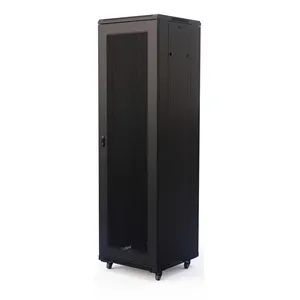
Networking gear (switches, patch panels) is typically shallow — about 300–500mm deep — so a 600mm-deep cabinet comfortably fits it with room for cable management. Rack servers are longer: 1U servers run 550–700mm, and larger 2U/GPU servers can exceed 800mm. If your primary load is servers, you want deeper cabinet volume. The Jergeo JNC-A 42U Network Cabinet provides a robust 42U framework for deep server-room builds.
Load capacity and rail strength
A single 1U server can weigh 20–35 kg; a full rack of servers plus storage easily exceeds 500 kg. Network-only racks carry switches and patch panels that are much lighter. A dedicated server cabinet uses thicker rails and additional bracing to safely support heavy compute loads. If you are mixing servers into a general-purpose cabinet, verify the load rating against your total equipment weight before mounting.
Airflow and cooling
Both cabinet types rely on front-to-rear airflow through perforated doors. The Jergeo JNC series uses honeycomb doors with ≥70% ventilation efficiency — 70% of the door surface is open airflow, not solid metal — which is the industry standard for housing heat-generating equipment. Dense server racks generate far more heat per U, so they need the most open airflow path and typically active fan or AC units added on top.
Side-by-side comparison
| Parameter | Network Cabinet | Server Cabinet |
|---|---|---|
| Primary equipment | Switches, routers, patch panels | Rack servers, storage, compute |
| Typical depth needed | 600mm (shallow gear) | 800–1200mm (long servers) |
| Load rating | Standard frame | Higher rated rails/bracing |
| Cooling emphasis | Airflow via ≥70% doors | Airflow + active cooling needed |
| Typical size | 9U–42U, 600×600mm | 42U, deeper footprint |
| Fiber termination | Via mounted patch panels | Via mounted patch panels |

When to choose a network cabinet
- Network closets and equipment rooms where the main load is switches, routers, and patch panels
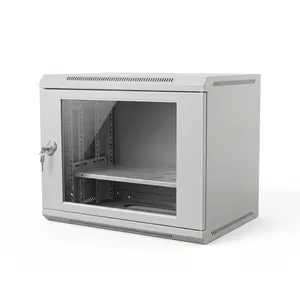
- Small office LAN deployments with a switch and a patch panel — a compact 9U cabinet fits tight spaces
- When you need organized cable management more than extreme load capacity
- Telecom rooms where 19-inch rack infrastructure hosts active network gear
When to choose a server cabinet
- Server rooms hosting multiple rack-mount servers, storage, and UPS units
- High-density compute racks where deep, heavy servers need stronger rails and airflow
- Data center builds requiring high load ratings and reliable cooling paths
- When you are combining servers, switches, and patch panels in one 42U footprint
Can one cabinet do both?
Industry guidance from the 19-inch rack standard (19-inch rack specification) confirms that the mountable width is standardized — what varies between "network" and "server" cabinets is depth, load, and cooling, not the 19-inch mounting width. Data center infrastructure design references such as the TIA-942 data center standard emphasize matching rack depth and cooling to the workload installed. Yes — and most real deployments use a general-purpose cabinet for both. The JNC-A 42U provides 42U of standard 19-inch space with honeycomb doors for airflow and top/bottom cable entry, comfortably holding switches at the top, servers in the middle, and patch panels at the bottom. For tighter spaces, the compact JNC-A 9U hosts a small switch and patch panel in one enclosed unit. The practical rule: match cabinet depth and load rating to your heaviest single piece of equipment, then size capacity (U count) to your total with 30% headroom for airflow and expansion.
Related Products
Related categories
Related Articles

Network Server Rack Cabinet Selection Guide
How to size and choose a network server rack cabinet for your deployment.
Read Article →
Rack Mount vs Wall Mount Fiber Patch Panel
Choosing where to mount your fiber termination panels.
Read Article →
Fiber Distribution Cabinet Buying Guide
Choosing between ODF and outdoor FDC for different deployment scenarios.
Read Article →