Optical Network Terminal Box (OTB)
The last passive enclosure before the subscriber — where every fiber path ends and every connection begins.
An optical terminal box (OTB) — also called a fiber optic terminal box or optical cable terminal box — is the endpoint enclosure in the FTTH distribution network. It receives the drop cable from the splitter box or distribution cabinet, splices or connectors the fibers inside, and provides the adapter ports where patch cords connect to the subscriber's ONT. It is the smallest and most numerous enclosure in any ODN deployment: a single neighborhood may have one FDC and a handful of FDBs, but hundreds of OTBs.
Jergeo manufactures OTBs from 2 to 192 ports in ABS, sheet metal, and cold rolled steel. The product line splits into two environmental tiers: IP54 models rated for -25°C to +40°C (indoor and sheltered outdoor), and IP65 models rated for -45°C to +65°C (fully exposed outdoor). All models support FC, SC, and LC adapters except the 2-port JOTB-2A, which uses SC only due to its compact size. Mounting is wall-mount across the range, with pole mounting available on the JOTB-2A.
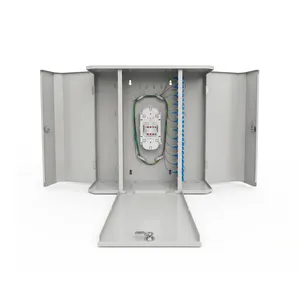
JOTB-192A Optical Terminal Box
High-capacity optical network terminal box, 192 ports, cold rolled steel. IP65, wall mount, outdoor FTTH. Factory direct, OEM/ODM, MOQ from 1.
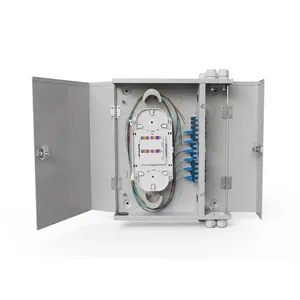
JOTB-48B Optical Terminal Box
Optical network terminal box, 48 ports, cold rolled steel with dual door. IP65, wall mount, outdoor FTTH. Factory direct, OEM/ODM, MOQ from 1.
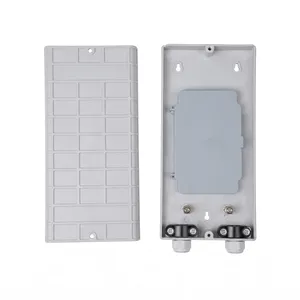
JOTB-24A Optical Terminal Box
Compact 24-port optical network terminal box, ABS plastic. IP54, wall mount, indoor FTTH. Factory direct, OEM/ODM, MOQ from 1.
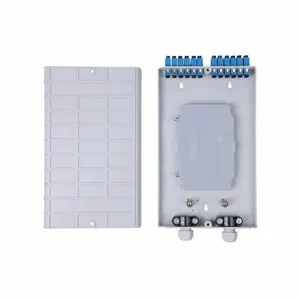
JOTB-12A Optical Terminal Box
Compact 12-port optical network terminal box, ABS plastic. IP54, wall mount, indoor FTTH. Factory direct, OEM/ODM, MOQ from 1.
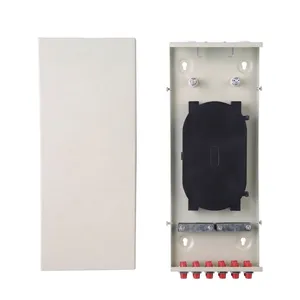
JOTB-12B Optical Terminal Box
12-port metal optical network terminal box for indoor and outdoor use. IP54, wall mount. Factory direct, OEM/ODM, MOQ from 1.
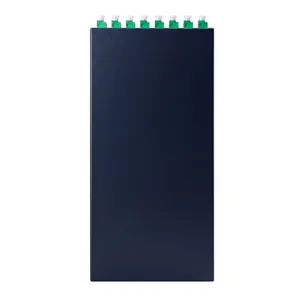
JOTB-8A Optical Terminal Box
Compact 8-port metal optical network terminal box. IP54, wall mount, indoor FTTH subscriber connection. Factory direct, OEM/ODM, MOQ from 1.
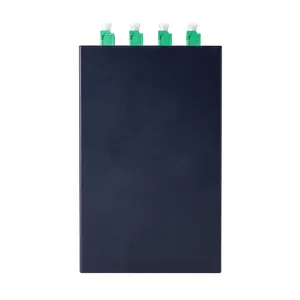
JOTB-4A Optical Terminal Box
Compact 4-port metal optical network terminal box. IP54, wall mount, indoor FTTH use. Factory direct, OEM/ODM, MOQ from 1.
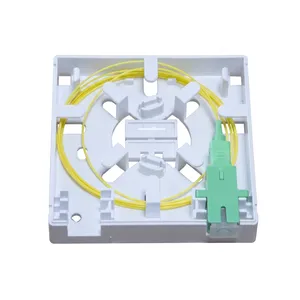
JOTB-2A Optical Terminal Box
Mini 2-port ABS optical network terminal box with wall and pole mounting. SC adapter, IP54, indoor FTTH. Factory direct, OEM/ODM, MOQ from 1.
Stop Confusing Terminal Boxes with Splitter Boxes — They Are Not Interchangeable
Three Enclosures, Three Jobs — OTB vs FDB vs FDC
These three enclosures sit at different points in the ODN chain, serve different functions, and cost different amounts. Getting them mixed up in a bill of materials is not a paperwork error — it is a field problem that shows up on installation day.
The signal path, with each enclosure labeled:
| FDC | FDB | OTB | |
|---|---|---|---|
| Primary function | Cross-connect feeder to distribution fibers | House PLC splitters and split the signal | Terminate fibers and connect to subscriber |
| Port range | 72–1152 | 12–96 | 2–192 |
| Contains splitters? | No | Yes (PLC splitters) | No |
| Contains splice trays? | Yes (drawer-type modules) | Yes | Yes |
| Typical location | Street cabinet, ground mount | Building wall or pole | Inside building, stairwell, or outdoor wall |
| Size | Large (up to 1550×1450×620mm) | Medium (up to ~400mm height) | Small (86mm to 600mm height) |
| Field interaction | Technician access for network changes | Technician access for splitter swaps | Subscriber connection point |
The critical distinction is between OTB and FDB, because they look similar and their port ranges overlap. Here is the simple rule: if the box houses a PLC splitter, it is an FDB. If the box only splices fibers and terminates them on adapter ports, it is an OTB. A 48-port OTB and a 48-port FDB have completely different internal layouts — the FDB has splitter slots, the OTB has splice trays and adapter strips.
In practice, most FTTH deployments use both: FDBs at the building entry to split the signal, and OTBs on each floor or in each stairwell to terminate the fibers and provide the connection point for the subscriber's patch cord.
Indoor OTBs Are Not Just Cheaper Outdoor OTBs — They Are Different Products
IP54 vs IP65 — The Temperature Gap That Becomes a Failure Gap
Jergeo OTBs come in two distinct environmental tiers. This is not a marketing distinction — it is a physical one that determines whether the box survives the installation.
IP54 — Indoor / Sheltered (JOTB-4A, 8A, 12A, 12B, 24A, 48A)
- Material: Plastic or sheet metal
- IP Rating: IP54 (dust-protected, splash-proof)
- Temperature: -25°C to +40°C
- Humidity: ≤85% at 30°C
- Sealing: Gasket seal, not designed for sustained water exposure
Best for:
MDU basements, building risers, floor-level telecom closets, sheltered outdoor under eave
IP65 — Outdoor / Exposed (JOTB-2A, 48B, 192A)
- Material: ABS or cold rolled steel
- IP Rating: IP65 (dust-tight, water-jet proof)
- Temperature: -45°C to +65°C
- Humidity: ≤95% at 40°C
- Sealing: Continuous gasket with cable entry sealing
Best for:
Exposed outdoor walls, utility poles (JOTB-2A only), any location with direct sun or rain
The difference matters more than the price gap suggests. An IP54 OTB installed on an exterior wall in a hot climate will cook. The +40°C upper limit is the internal temperature — direct sun on a metal or plastic box can push internal temperature 15–25°C above ambient. In Dubai, Riyadh, or Singapore, that means internal temperatures exceeding 55°C on a regular basis. The splice sleeves and adapter contacts degrade, and the gasket hardens faster. The box technically works on day one. It fails in year two.
Decision Matrix — Where Will You Mount It?
| Installation Location | IP54 OK? | IP65 Required? | Recommended Tier |
|---|---|---|---|
| Inside building (basement, riser, utility closet) | ✓ | — | Tier 1 |
| Sheltered outdoor (under eave, covered balcony) | ✓ | — | Tier 1 (mild climate) |
| Exposed outdoor wall (no overhang) | — | ✓ | Tier 2 |
| Utility pole / street lamp pole | — | ✓ | Tier 2 (JOTB-2A only) |
| Underground manhole or handhole | — | — | Use FSC instead |
The Widest Range in Any ODN Product Category — And How to Use It
From 2-Port to 192-Port — Matching Port Count to the Building
No other ODN product category spans 2 to 192 ports. That range exists because OTBs serve every scale of subscriber termination — from a single-home FTTH drop to a 40-story tower's fiber riser.
| Port Count | Building Type | Typical Deployment | Jergeo Model(s) |
|---|---|---|---|
| 2 | Single-family home / villa | One fiber in, one drop to ONT | JOTB-2A |
| 4–8 | Small office / shop | 2–4 subscribers, simple layout | JOTB-4A, JOTB-8A |
| 12 | Low-rise MDU (3–6 floors) | One OTB per stairwell | JOTB-12A, JOTB-12B |
| 24 | Mid-rise MDU (6–12 floors) | Floor-level termination | JOTB-24A |
| 48 | High-rise MDU or campus building | Building entry or floor aggregation | JOTB-48A, JOTB-48B |
| 192 | Large tower or campus hub | Building riser, multiple floors | JOTB-192A |
Spare Fiber Planning — Size at 1.5× Current Subscribers
A fully populated OTB leaves zero room for three things that happen in the real world:
- Subscriber additions. A building that has 8 subscribers today will have 12 within two years. If you installed an 8-port OTB, you are replacing it — which means cutting and re-splicing every active fiber.
- Fiber rerouting. When a splitter ratio changes upstream (e.g., from 1:8 to 1:16), the downstream OTB may need additional ports to handle the new distribution.
- Damage repair. A damaged fiber stub at the adapter port cannot always be re-terminated — sometimes the fiber must be cut back past the splice point and re-spliced with a new pigtail, consuming one additional splice sleeve and one additional adapter position.
Practical rule: size the OTB at 1.5× current subscriber count, minimum. For 8 subscribers, use a 12-port OTB. For 16, use a 24-port. For 32, use a 48-port. The cost difference between an 8-port and a 12-port OTB is trivial. The cost of replacing an 8-port OTB with a 12-port one after installation is not.
The 192-Port Exception: JOTB-192A
At 600×605×300.5mm with 3 doors and cold rolled steel construction, it fills the gap between a large OTB and a small FDC. Use it when you need high-density fiber termination inside a building (basement or riser) and do not need the cross-connect functionality or ground-mount footprint of an FDC. It is wall-mounted, so no pad or foundation is required. With ≤8 splice trays and 192 splice sleeves, it can terminate an entire building's fiber infrastructure in a single enclosure.
Related Solutions
See how terminal boxes complete the FTTH subscriber connection
Explore FTTH Network Solution