Outdoor Telecom Cabinet (OTC)
The enclosure where passive ODN meets active network equipment — rack-mounted, weather-sealed, and built to keep electronics alive outdoors.
An outdoor telecom cabinet (OTC) — also called an outdoor equipment cabinet, street cabinet, or telecom enclosure — is a weatherproof enclosure that houses active telecom equipment (OLT, switches, routers) and supporting infrastructure (PDU, UPS, batteries) on standard 19-inch rack rails. Unlike FDCs and FDBs, which manage passive fiber connections, an OTC exists because the equipment inside it requires power, cooling, and structural mounting that a passive fiber enclosure cannot provide.
Jergeo manufactures three OTC models. Two are IP55-rated cold rolled steel cabinets with internal thermal management (JOC-A and JOC-B). One is an IP65-rated SMC cabinet designed for passive fiber distribution with optional 19-inch equipment mounting (JOC-C). This split is not arbitrary — it reflects two fundamentally different use cases: one where you need to keep electronics at operating temperature outdoors, and one where you need a sealed fiber cabinet that can also accommodate rack-mount equipment.
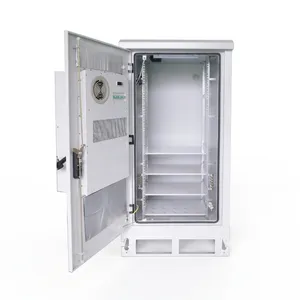
JOC-A Outdoor Telecom Cabinet
Large outdoor telecom cabinet with 16U/31U capacity. Cold rolled steel, IP55, thermal management. 19-inch rack. Factory direct, OEM/ODM, MOQ from 1.
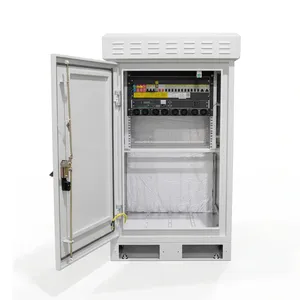
JOC-B Outdoor Telecom Cabinet
Medium outdoor telecom cabinet with 11U capacity. Cold rolled steel, IP55, thermal management. 19-inch rack. Factory direct, OEM/ODM, MOQ from 1.
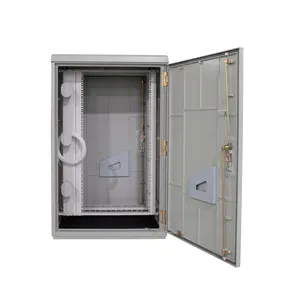
JOC-C Outdoor Telecom Cabinet
22U outdoor telecom cabinet with SMC material. IP65 passive cooling, 19-inch rack mount. Factory direct, OEM/ODM, MOQ from 1.
If It Has a Power Cord Going In, It Belongs in an OTC — Not an FDC
OTC vs FDC — Same Neighborhood, Different Job
Outdoor telecom cabinets and fiber distribution cabinets are often installed within meters of each other on the same street. They are both ground-mounted, both gray, both weather-sealed. But they serve completely different purposes, and putting the wrong equipment in the wrong enclosure is a field problem that shows up on the first power bill.
| FDC | OTC | |
|---|---|---|
| What goes inside | Passive: splice trays, adapter modules, pigtails | Active: OLT, switches, routers, UPS, PDU, batteries |
| Requires power? | No | Yes (mains or solar) |
| Requires cooling? | No (fibers do not generate heat) | Yes (electronics generate 200W–2kW+) |
| Mounting standard | Custom drawer-type modules | 19-inch rack (EIA-310) |
| Thermal management | None needed | Fan, heat exchanger, or TEC |
| Typical cost driver | Port count and material | Rack units and thermal capacity |
| Who accesses it | Fiber technician | Network engineer |
The fundamental difference: an FDC connects fibers, an OTC houses electronics. An FDC has no power inlet, no fans, no heat exchanger, no UPS bay. If you try to put an OLT inside an FDC, you will need to cut holes for power cables and ventilation — which destroys the IP65 seal. Conversely, an OTC has 19-inch rails but no splice-and-distribution modules. If you try to use it as an FDC, you are wasting rack units on fiber management that a passive enclosure handles for a fraction of the cost.
In a typical FTTH deployment, they work as a pair: the OTC houses the OLT and distribution switch, and the FDC sits next to it (or a few poles away) handling the fiber cross-connect. The OLT's PON ports feed into the FDC's adapter modules through a short patch cord run.
When an OTC replaces an FDC: The JOC-C
The JOC-C is the exception. With IP65, SMC shell, front-and-rear doors, and an operating range of -45°C to +80°C, it can function as both an FDC and a 19-inch equipment cabinet. It ships with worm-gear clamps, fiber protection tube, and adapter options (FC/SC/LC) — the same fiber management accessories as an FDC. Use it when you need a single enclosure that handles both fiber distribution and a small amount of rack-mount equipment (e.g., an OLT + UPS) in a location where installing two separate cabinets is not feasible.
The IP Rating Tells You What Is Inside, Not Just What Gets In
IP55 with Thermal Management vs IP65 Passive — Two Products, Not One Product Line
JOC-A and JOC-B are IP55. JOC-C is IP65. If you are comparing spec sheets and treating IP rating as a simple "better or worse" axis, you are reading the wrong number. The IP rating is a consequence of the thermal management design, not an independent choice.
IP55 + Thermal Management (JOC-A, JOC-B)
These cabinets house active electronics that generate heat. The internal temperature must be kept at 0°C to +35°C for the equipment to operate correctly. This requires air circulation — fans, heat exchangers, or thermoelectric coolers that move heat from inside the cabinet to outside. Moving air means vents. Vents mean the cabinet cannot be fully sealed. IP55 is the practical maximum for a cabinet with active cooling: dust-protected and splash-proof, but not water-jet proof because the ventilation openings are required for airflow.
| Parameter | JOC-A | JOC-B |
|---|---|---|
| External working range | -40°C to +55°C | -40°C to +55°C |
| Internal temperature | 0°C to +35°C | 0°C to +35°C |
| Storing temperature | -40°C to +70°C | — |
| External humidity | 5%–95% | 5%–95% |
| Internal humidity | 5%–80% | 5%–80% |
That +55°C external / +35°C internal gap means the thermal management system must remove enough heat to keep the internal temperature 20°C below ambient on a hot day — while the equipment inside is adding its own heat load. This is not a spec you verify on paper — it requires a thermal calculation based on your specific equipment list and the local climate data.
IP65 Passive (JOC-C)
The JOC-C has no thermal management. No fans, no vents, no heat exchanger. It is a sealed SMC enclosure with an operating range of -45°C to +80°C — the same range as Jergeo FDCs. This works because the JOC-C is designed for deployments where the equipment inside generates minimal heat, or where the equipment is rated for the full -45°C to +80°C range (some industrial-grade OLTs and media converters are). No vents = no airflow path = IP65 is achievable.
Decision logic — which one do you need?
| Your Equipment | Heat Load | Choose |
|---|---|---|
| OLT + UPS + PDU (standard telecom) | 200W–1kW+ | JOC-A or JOC-B (IP55) |
| Industrial-grade OLT only (no UPS) | <200W | JOC-C (IP65) |
| Fiber distribution + small media converter | <50W | JOC-C (IP65) |
| Full street cabinet with batteries | 1kW+ | JOC-A 31U (IP55) |
If your equipment is not rated for outdoor temperatures up to +55°C without active cooling, you need the JOC-A or JOC-B. Period. No workaround exists.
A Rack Unit Is 44.45mm — Plan Your Stack Before You Buy the Cabinet
Sizing by Rack Units — What Actually Fits in 11U, 16U, 22U, and 31U
Unlike FDCs (sized by fiber port count), OTCs are sized by rack units (U). One rack unit is 1.75 inches or 44.45mm of vertical space. Equipment height is measured in U. A 1U switch is 44.45mm tall. A 2U UPS is 88.9mm. The rack unit math is simple but unforgiving: if your equipment stack exceeds the cabinet height, you either cut something from the list or buy the next size up.
| Equipment | Height | Notes |
|---|---|---|
| OLT (8-port GPON) | 1U–2U | Depends on vendor; Huawei MA5800 is 2U |
| Distribution switch (24-port) | 1U | Standard 1U Ethernet switch |
| PDU (power distribution unit) | 1U | Horizontal mount, 8–12 outlets |
| UPS (1kVA) | 2U–3U | Rack-mount UPS; battery-only units may be 2U |
| Battery module | 2U–4U | External battery pack for UPS runtime |
| ODF / fiber management | 1U–2U | Patch panel or splice tray insert |
| Cable management | 1U | Horizontal cable organizer |
| Blank / ventilation | 1U | Air gap between heat-generating equipment |
Minimum stack (basic FTTH node, no UPS)
OLT (2U) + Switch (1U) + PDU (1U) + ODF (1U) + Cable management (1U) = 6U of equipment. Add 1U blank for airflow = 7U. That fits in the JOC-B (11U) with room to grow.
Full stack with UPS and batteries
OLT (2U) + Switch (1U) + PDU (1U) + UPS (3U) + Battery (4U) + ODF (2U) + Cable management (1U) + Blank (1U) = 15U. That needs the JOC-A 16U minimum.
| Cabinet | Usable U | Basic FTTH (no UPS) | Full Stack (with UPS) | Room to Grow |
|---|---|---|---|---|
| JOC-B | 11U | ✅ Fits (6U used) | ❌ Too small (15U needed) | 5U spare |
| JOC-A (16U) | 16U | ✅ Fits (6U used) | ✅ Fits (15U used) | 1U spare — tight |
| JOC-A (31U) | 31U | ✅ Fits (6U used) | ✅ Fits (15U used) | 16U spare |
| JOC-C | 22U | ✅ Fits (6U used) | ✅ Fits (15U used) | 7U spare |
Practical advice
- Always buy one size larger than your current equipment stack needs. The cost difference between 16U and 31U in the JOC-A is negligible compared to the cost of replacing the cabinet when you add a second OLT or a battery backup in year two.
- Account for cable routing. The vertical cable management channel at the rear of the rack consumes 1–2U equivalent of depth. Dense patch cord routing in a shallow cabinet (JOC-B at 700mm depth) is harder than in a deep cabinet (JOC-A at 750mm).
- The JOC-C is a fiber cabinet first, equipment cabinet second. Its 22U capacity and SMC shell make it suitable for small equipment stacks (OLT + PDU, no UPS), but it does not have thermal management. If your equipment needs to stay below +35°C, the JOC-C will not keep it there in a hot climate.
Related Solutions
See outdoor cabinet solutions for harsh environments
Explore Outdoor Deployment Solution