Network Server Cabinet
The steel frame that houses your switches, servers, and patch panels — standard 19-inch mounting, ventilated honeycomb doors, and cable routing from top to bottom.
A network cabinet (also called a server rack, 19-inch rack, or equipment cabinet) is the structural backbone of every equipment room. It does not terminate fibers, split signals, or distribute light — it provides the physical framework that holds the equipment that does. Switches, routers, servers, UPS units, patch panels, and cable managers all mount into a standard 19-inch rail system inside the cabinet. If the ODF is where the fiber ends, the network cabinet is where the fiber meets active electronics.
Jergeo manufactures network cabinets in two sizes: a full-height 42U floor-standing cabinet (JNC-A-42U) and a compact 9U cabinet (JNC-A-9U). Both are cold rolled steel with standard 19-inch internal mounting rails. Both use honeycomb-pattern doors that deliver ≥70% ventilation efficiency — which means 70% or more of the door surface area is open airflow, not solid metal. Cables route from top and bottom through customizable entry points. Door options include mesh, glass, and fully enclosed configurations on the 42U model.
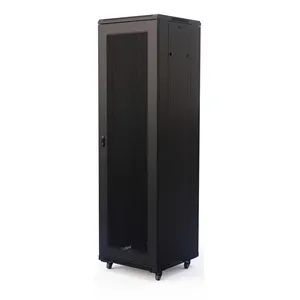
JNC-A 42U Network Cabinet
Large 42U network server cabinet with honeycomb mesh doors. Cold rolled steel, ≥70% ventilation, 19-inch rack. Factory direct, OEM/ODM, MOQ from 1.
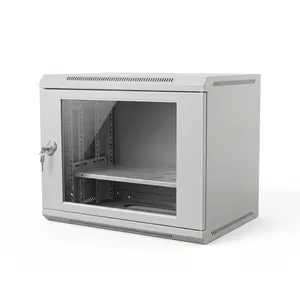
JNC-A 9U Network Cabinet
Compact 9U wall-mount network server cabinet. Cold rolled steel, honeycomb door, 19-inch rack. Factory direct, OEM/ODM, MOQ from 1.
If You Are Comparing These Three, You Need All Three — Not One
Network Cabinet vs ODF vs FDC — Three Products, Three Jobs
A lot of product searches conflate network cabinets, ODFs, and FDCs because they all have “cabinet” in the name and they all sit in equipment rooms. But they do fundamentally different things, and confusing them leads to buying the wrong product.
Network Cabinet (JNC series): Houses active equipment. Switches, routers, servers, UPS units, patch panels. The cabinet provides physical support, cable management, airflow, and physical security (lockable doors). It has no fiber splicing infrastructure built in — you add patch panels inside it if you need fiber termination. The network cabinet is the “building” where the IT equipment lives.
ODF (JODF series): Terminates and distributes fiber. It is a dedicated passive fiber frame, typically 42U tall, with splice trays, adapter panels, and fiber routing infrastructure pre-installed. You do not mount switches inside an ODF — the internal space is dedicated to fiber management. The ODF is the “telephone exchange” for your fiber plant.
FDC (JFDC series): Distributes fiber outdoors. It is an IP65-rated sealed enclosure that sits on a sidewalk or a building exterior, terminating feeder cables and distributing drop cables to subscribers. The FDC is the “junction box” in the field — weatherproof, tamper-resistant, and built for technicians working on the street.
Here is the reality in a typical equipment room:
| Equipment | What It Does | Where It Goes |
|---|---|---|
| OLT | Active headend for PON network | Network cabinet |
| Switch / Router | Active network equipment | Network cabinet |
| UPS | Power backup | Network cabinet |
| Patch panel | Fiber termination inside rack | Network cabinet (mounts inside) |
| ODF | Standalone fiber distribution | Floor, next to racks |
| Server | Compute and storage | Network cabinet |
Bottom line
A network cabinet is for housing 19-inch equipment. An ODF is for terminating fiber. An FDC is for distributing fiber outdoors. If you are building an equipment room, you probably need at least one of each.
The Door Type Determines Whether Your Equipment Cooks, Runs Quiet, or Stays Visible
Door Types and Ventilation — Why ≥70% Is Not a Random Number
The JNC-A-42U offers three door configurations for both front and rear: mesh (honeycomb), glass, and fully enclosed sheet metal. This is not a cosmetic choice. The door type directly affects the thermal environment inside the cabinet, and choosing the wrong one is the single most common cause of equipment overheating in small server rooms.
Honeycomb Mesh Doors (Ventilation ≥70%) — The honeycomb pattern punches out most of the metal from the door surface, leaving a perforated mesh that allows air to flow freely. The ≥70% ventilation efficiency means that at least 70% of the door’s surface area is open airflow passage. A typical 48-port PoE switch draws 300–500W. A fully loaded 42U cabinet can dissipate 5–15 kW of heat. Without adequate ventilation, the internal temperature rises above the equipment’s rated working range, and you get thermal throttling, reduced lifespan, or outright failure. Mesh doors are the default for any cabinet housing networking equipment with forced-air cooling.
Glass Doors — Provide visibility for equipment status LEDs without opening the cabinet. Used in NOCs and monitoring rooms. The trade-off: glass blocks airflow. A glass-fronted cabinet relies on internal fans or room air conditioning. Appropriate for low-density monitoring or display installations, not for full-load server racks.
Fully Enclosed Sheet Metal Doors — Seal the cabinet from dust, noise, and physical access. Used in industrial environments or noise-sensitive offices (can reduce fan noise by 10–15 dB). The trade-off: zero natural ventilation. Needs active cooling — internal fans with vented panels, or connection to precision air conditioning.
| Deployment Scenario | Front Door | Rear Door | Reason |
|---|---|---|---|
| Standard network rack | Mesh | Mesh | Maximum airflow, standard practice |
| NOC / monitoring display | Glass | Mesh | Visible status, rear ventilation |
| Industrial / dusty | Enclosed | Enclosed | Dust protection, active cooling required |
| Office, noise-sensitive | Enclosed | Enclosed | Noise reduction, active cooling required |
| Mixed IT + fiber (low density) | Glass | Mesh | Visibility + airflow |
About the JNC-A-9U
The JNC-A-9U ships with a glass front door and removable rear panel. For a 9U cabinet that typically holds a small switch, a patch panel, and maybe a media converter, the low heat output makes glass front doors viable without supplemental cooling.
These Are Not Two Sizes of the Same Product — They Solve Different Problems
42U vs 9U — Full Rack or Compact Cabinet, Not a Compromise
The JNC-A-42U and JNC-A-9U share the same 19-inch rail standard and the same cold rolled steel construction. That is where the similarity ends. They are designed for entirely different deployment scenarios.
JNC-A-42U: The Full-Height Server Rack — At 2050mm tall, it needs a dedicated floor space of at least 600×600mm, plus clearance for doors and rear cabling access. Footprint roughly 600×1800mm including access space. 42U accommodates a substantial amount of equipment. A typical telecom deployment uses about 13U, leaving ~29U for future expansion.
JNC-A-9U: The Compact Cabinet — At 450mm tall, small enough for desk or wall-mount. Ships with M6×60mm expansion bolts. A typical small office deployment uses about 3U, leaving 6U available.
| Condition | Choose This |
|---|---|
| Dedicated equipment room with raised floor | JNC-A-42U |
| Small wiring closet or telecom cabinet | JNC-A-9U |
| Need to house servers (2U or larger) | JNC-A-42U |
| Only switches and patch panels | JNC-A-9U (if <9U total) |
| Building main distribution point | JNC-A-42U |
| Single floor distribution point | JNC-A-9U |
| Future expansion (10+ units of equipment) | JNC-A-42U |
| Fixed equipment set, no growth expected | JNC-A-9U |
Practical advice
If you think you need a 42U cabinet, get a 42U cabinet. Do not try to save space with a 22U or 18U half-rack — the cost difference is minimal, and you will need the full height sooner than you think. The only reason to go smaller than 42U is if the physical space genuinely cannot accommodate a full-height rack.
Related Solutions
See network cabinet solutions for data center rack infrastructure
Explore Data Center Solution