Outdoor Surveillance Cabinet
Outdoor surveillance and CCTV camera cabinet that protects your security electronics — cameras, NVRs, power supplies, and telecom gear — from rain, dust, heat, and tampering.
A monitoring cabinet (also called a surveillance equipment box, outdoor equipment enclosure, or camera pole cabinet) is a weatherproof enclosure that houses the active electronics supporting an outdoor surveillance or monitoring system. It is not a fiber distribution point (that is an FDC), and it is not a telecom equipment shelter (that is an OTC). It sits on a camera pole, a building wall, or a concrete pad at a surveillance site, and it keeps the power supplies, media converters, NVRs, and communication gear running in conditions that would destroy unprotected equipment in weeks.
Jergeo manufactures monitoring cabinets in four configurations: two compact wall/pole-mount models (JMC-A in galvanized sheet with IP55, JMC-B in 304 stainless steel with IP65) and two ground-mount models (JMC-C in galvanized sheet with IP55, JMC-D in galvanized sheet with IP65). All models operate from -40°C to +85°C and feature customizable internal components — because every surveillance site has different power, communication, and mounting requirements.
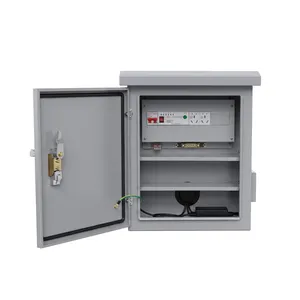
JMC-A Outdoor Surveillance Cabinet
Wall and pole mount outdoor surveillance cabinet for CCTV equipment, galvanized sheet. IP55, -40 to +85°C, weatherproof camera box. Factory direct, OEM/ODM, MOQ from 1.
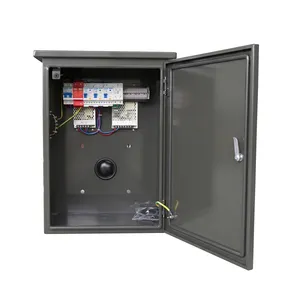
JMC-B Outdoor Surveillance Cabinet
Stainless steel outdoor surveillance cabinet for security cameras with IP65. 304 steel, -40 to +85°C, wall or pole mount CCTV enclosure. Factory direct, OEM/ODM, MOQ from 1.
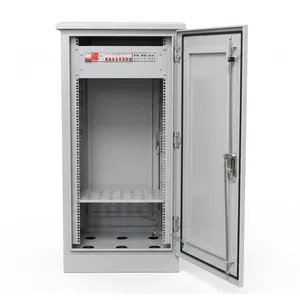
JMC-C Outdoor Surveillance Cabinet
Ground mount outdoor surveillance cabinet for CCTV and security equipment with IP55. Galvanized sheet, -40 to +85°C. Factory direct, OEM/ODM, MOQ from 1.
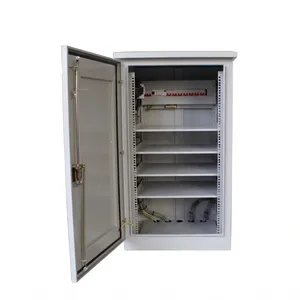
JMC-D Outdoor Surveillance Cabinet
Large ground mount outdoor surveillance cabinet for security cameras with IP65. Galvanized sheet, -40 to +85°C. Factory direct, OEM/ODM, MOQ from 1.
One Houses a Camera System, the Other Houses a Network Node — and the Internal Design Follows
Monitoring Cabinet vs Outdoor Telecom Cabinet — Both Outdoor, Different Jobs
Monitoring cabinets and outdoor telecom cabinets (OTC) are both IP-rated outdoor enclosures. They both protect electronics from weather. They are not interchangeable, and the confusion is common enough to address directly.
Monitoring Cabinet (JMC series): Designed for surveillance and security electronics. The internal layout is open-configurable — you mount DIN-rail power supplies, NVRs, media converters, PoE switches, and communication modules on whatever internal brackets or rails suit your design. The cabinet ships as a protective shell; the internal component layout is your responsibility, and Jergeo can customize the internal mounting to match your equipment list. Monitoring cabinets are typically small (the wall-mount models are 516–600mm tall) and are installed at the surveillance site — on the camera pole itself or on the wall adjacent to the monitored area.
Outdoor Telecom Cabinet (JOC series): Designed for telecom network equipment with integrated thermal management. The OTC has built-in fans, temperature controllers, and sometimes heaters — because telecom equipment (OLTs, switches, base station electronics) generates significant heat and must operate within a narrow internal temperature range (typically 0–35°C). The OTC is a managed environment inside a weatherproof shell. It is larger (11U to 31U), heavier, and costs more because of the thermal system.
The critical distinction: thermal management.
| Feature | Monitoring Cabinet | Outdoor Telecom Cabinet |
|---|---|---|
| Internal thermal control | None (passive) | Fans, heater, thermostat |
| Equipment type | Power supplies, NVRs, media converters | OLTs, switches, base station gear |
| Typical power dissipation | 50–300W | 500W–3kW |
| Internal temperature | Follows ambient (-40°C to +85°C) | Controlled (0–35°C inside) |
| Size | 516–1350mm tall | 1300–1600mm tall |
| Cost driver | Shell quality, IP rating | Thermal system, shell quality |
| Mounting | Wall, pole, or ground | Ground only |
Rule of thumb
If the equipment inside needs temperature control beyond what the ambient provides, you need an OTC. If the equipment is rated for the full outdoor temperature range and you just need weather protection, a monitoring cabinet is the correct and economical choice.
The Difference Is Not Subtle — One Tolerates Rain, the Other Survives a Hose-Down
IP55 vs IP65 — Two Ratings, Two Realities of Water and Dust Exposure
IP55 and IP65 are not "basically the same." The first digit (dust) and the second digit (water) each tell you something specific about what the cabinet can withstand.
IP55 breakdown: First digit 5 = dust-protected (dust ingress not entirely prevented, but does not interfere with operation). Second digit 5 = protected against water jets from any direction.
IP65 breakdown: First digit 6 = dust-tight (no ingress of dust whatsoever). Second digit 5 = same water jet protection as IP55.
The difference between IP55 and IP65 is the dust rating — IP65 is fully dust-tight; IP55 allows some fine dust penetration. The water protection is the same (both withstand water jets from any direction).
| Installation Environment | Dust Exposure | Water Exposure | Recommended IP |
|---|---|---|---|
| Urban building wall, under eave | Low | Sheltered | IP55 adequate |
| Camera pole, open intersection | Moderate | Direct rain | IP55 OK, IP65 preferred |
| Desert / arid region | High | Rare rain | IP65 |
| Coastal / marine | Moderate | Salt spray + rain | IP65 |
| Industrial zone | High | Possible chemical exposure | IP65 |
| Tropical, heavy monsoon | Low–moderate | Driving rain | IP65 |
Why JMC-B uses IP65 + 304 stainless steel
The JMC-B combines IP65 (dust-tight) with 304 stainless steel. This is not overkill for coastal and offshore surveillance — salt spray corrodes galvanized steel over time, and the dust-tight IP65 seal prevents salt-laden air from reaching internal electronics. If your site is within 1 km of coastline or on an offshore installation, the JMC-B is the correct specification. Neither IP55 nor IP65 protects against immersion — mount above the flood line.
The Cabinet Size Is Determined by Where It Goes, Not by How Much Equipment You Want to Stuff In
Wall/Pole Mount vs Ground Mount — Physical Reality of Where Your Equipment Lives
Jergeo monitoring cabinets come in two physical families: compact wall/pole-mount units (JMC-A/B at 516–600mm tall) and full-size ground-mount units (JMC-C/D at 1200–1350mm tall). The choice is not about capacity — it is about where the cabinet physically sits at the surveillance site.
Wall/Pole Mount (JMC-A / JMC-B): Designed to mount on the camera pole itself or on the wall adjacent to the surveillance point. The power supply, PoE injector, and media converter should be as close to the camera as possible, to minimize exposed outdoor cable runs. The JMC-A (516×400×205mm) is small enough for a standard 100–150mm diameter camera pole. It weighs roughly 5–8 kg empty, 10–15 kg with equipment. Pole-mount uses stainless steel banding (Band-It type) or U-bolts.
Ground Mount (JMC-C / JMC-D): Free-standing enclosures on a concrete pad. Used when the site requires more equipment — multi-camera installation with local NVR, PoE switch for 8–16 cameras, fiber patch panel, UPS backup, and communication equipment. Requires a concrete foundation pad with cable entry conduits, elevated 50–100mm above grade.
| Condition | Choose This |
|---|---|
| 1–2 cameras, pole-mounted | JMC-A (IP55) or JMC-B (IP65) |
| 3–8 cameras, small NVR, pole or wall | JMC-B (larger internal space) |
| 8+ cameras, full NVR, switch, UPS | JMC-C (IP55) or JMC-D (IP65) |
| Pole cannot support 10+ kg | Ground mount (JMC-C or JMC-D) |
| Coastal / salt spray environment | JMC-B (stainless + IP65) or JMC-D (IP65) |
| Urban intersection, moderate climate | JMC-A (IP55, galvanized) |
| Industrial zone, high dust | JMC-D (IP65, ground mount) |
Related Solutions
See outdoor surveillance cabinets in telecom network management
Explore ISP & Telecom Solution